How to Determine if a Deduction is Pre/Post Tax
When loading payroll history in the application, some deductions will not be listed as Pre/Post tax on the prior payroll provider payroll reports. You can use the deduction models article to differentiate the deduction types and how they are taxed.
You can multiply the gross pay by the Social Security or Medicare rate to see if the answer matches the tax amount that was deducted from the employee's gross pay. If it matches it is a Post Tax deduction. If it does not match then it is a Pre-Tax deduction. Note, keep in mind about rounding.
Payroll History Example:
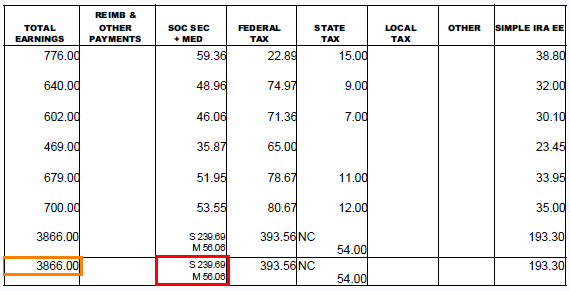
Pre-Tax (Before Taxes): Usually Doesn't Match
3866 x 1.45% = 56.057
OR
3866 x 6.2% = 239.692
Post Tax (After Taxes): Matches
3866 x 1.45% = 56.057
OR
3866 x 6.2% = 239.692